
HEY GUYS WELCOME
I have explained every and each steps to install React in your local pc ,It will help you to resolve your problem that you are tackling/facing during its installation.
LETS KNOW FIRST WHAT IS REACT JS
React JS is a open source to Javascript Library is used to create dynamic and interactive user interface for mobile and web application.
In short points
- highly flexible
- scalable
- fast front-end for web & mobile applications
KNOWLEDGE REQUIRED FOR REACT JS:
- HTM
- CSS
- JAVASCRIPT
- NODE AND NPM
"Very crucial information ,Here we are using virtual DOM instead of Real DOM"
"In React JS every application UI is broken into Component ,that makes easy to handle"
Formate of file Naming =>filename with capital letter then dot jsx ( first.jsx )
JSX( Javascript Syntax Extension)
DATA FLOW UNIDIRECTION
React JS follows one-way data binding or unidirectional data flow that gives better control throughout the application.
# React JS Installation part #
Carefully trash every step of installation of react js in your local pc
Install Visual Studio Code
Download and install Visual Studio Code from the following
URL =>https://code.visualstudio.com/download
step 1: open browser and write node install
download from official node js website
website link : https://nodejs.org
Once Completed then check the version
Install Create-React-App Tool
step 2: Run the given below command in your laptop powershell
=> npm install -g create-react-app
Creating a new react project
step 3: after the completion of step 2, Create project and application in C:\
Let's create a new Project now using the command.
=> create-react-app test-project
you folder structure will resemble with this
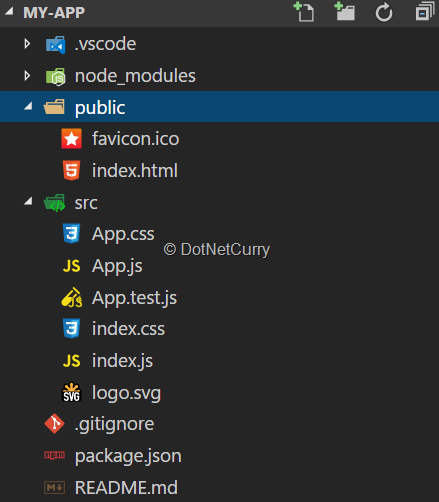
Running the React Application
the Project we have created and run it locally on our system using npm start. Launch the browser and visit http://localhost:3000. We can then see our first React Application running in the browser.
step4: cd test-project
npm start
 |
React animation will appear in browser
if you has followed the steps of installation correctly ,by chance you are facing any problem then once repeat /read the steps of installation carefully.
Let's initiate the web project ,first of we are gonna to make amazing single page website,
Modules required:
- npm
- create-react-app
- styled-components
- react-router-dom
first we check npm installed perfectly
write this command on terminal :
node -vInstallation in done :
Every Thing is now done perfectly so we are gonna make navbar ,
we’ll only need to install the React Router library to help us switch views of the HOME in our app when we click on the HOME on the links.
npm install react-router-domFirst, we’ll build the navbar itself. To do that, we’ll create a file named Navbar.js in src/component
We have to import Link from the react-router-dom library we’ve already installed. <Link> comes out of the box from the React Router library to allow us to navigate to the exact route name in the to attribute. What it does is convert whatever’s inside the attribute (text, images, etc.) into a link. When you click it, you are taken to the route that’s already indicated in the to attribute.
NOW WE ARE GONNA MADE THE INDIVIDUAL " to " ATTRIBUTE LINK
now we are creating each page for each "to" attribute (for '/' ,'/Contact', '/Service' ,'/Detail').
We’ll place them in src/pages/navbar, like so:
>>>>>>page for '/'<<<<<<<<<
>>>>>>page for '/Contact'<<<<<<<<<
>>>>>>page for '/Service'<<<<<<<<<
>>>>>>page for '/Detail'<<<<<<<<<
Now, go into your App.js, and import react-router-dom into your project:
Congratualations Guys You have learned How to make Navbar using Link , Router and Switch


No comments:
Post a Comment